
See ApprovalMGR in action
FAQ
- How does ApprovalMGR connect to Xero?
- You authorise ApprovalMGR against your Xero organisation using Xero's standard OAuth flow. One subscription covers one Xero organisation.
- Can you have multiple approvers?
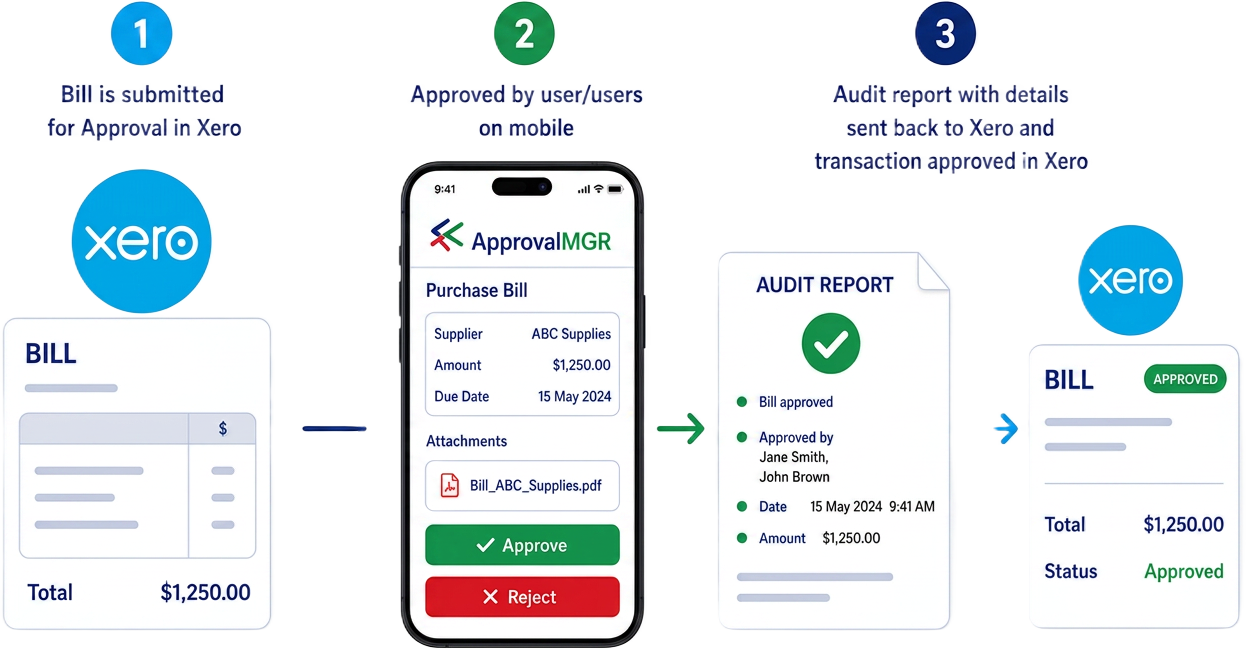
- Yes. A transaction can be routed through multiple approvers - each one reviews and approves in turn, and the transaction is only finalised in Xero after the final approval.
- What does the approver see?
- Approvers get a clean, simple approval screen showing the transaction summary and any attached documents, on mobile or PC. They approve or decline - no Xero login required. They can also approve across multiple organisations in the one place.
- What happens when a transaction is approved?
- On final approval the Xero transaction is updated to Awaiting payment, an audit PDF is attached to the transaction, and the Xero audit notes are updated.
- What happens when a transaction is declined?
- The transaction is reverted to draft in Xero and the admin is notified. Any comments are added to the Xero transaction so your admin team can fix and resubmit.
- Do I need one subscription per Xero organisation?
- Yes - one subscription covers one Xero organisation.